Amps in EA FC 27: temporary boosts, Affinity and attribute limits
How Amps differ from permanent progression, what to check on an item card and why Signature does not guarantee a gold PlayStyle.
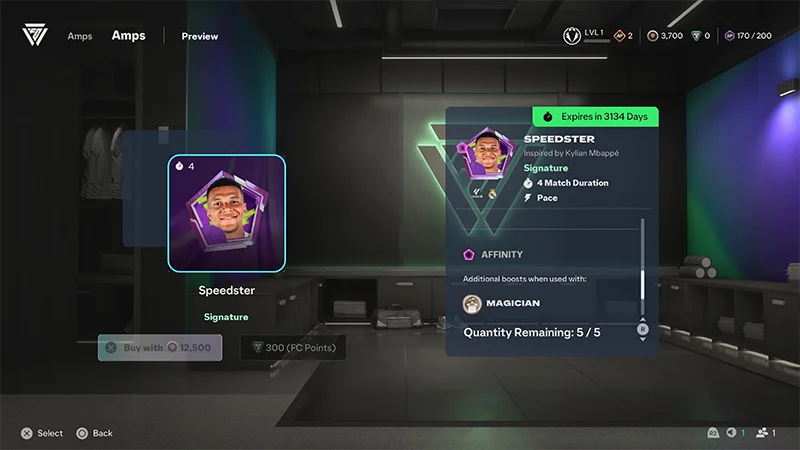
are a separate layer of temporary boosts in EA FC 27. They are easy to confuse with permanent archetype progression, especially when comparing attribute screenshots from different players.
What to check on an Amp card
EA describes Amps as items lasting for a limited number of matches. There are two Standard slots and one Signature slot. Each item determines its own effects and duration.
Some items have : an additional effect when used with a matching archetype. A different archetype may still receive the regular boost, but not the affinity bonus.
Before applying an Amp, check:
- The exact attributes or gameplay effects listed.
- How many matches remain.
- Whether the affinity matches your archetype.
- Whether an attribute is already at its cap.
- Whether the item works in your chosen activity.
EA's help page states that an Amp cannot raise an attribute above its maximum. Amps do not apply in Kickabouts, and those matches do not use up their duration.
Why Signature does not automatically mean PlayStyle+
EA's launch announcement specifically said that Amps did not grant PlayStyle+ at launch. The word Signature or a general item-tier table does not confirm a gold in the current reward pool. Check the actual item card.
Comparing builds without confusion
Save your regular build first, then record the applied Amp and its remaining matches separately. Otherwise, a temporary rating on the game screen can easily be mistaken for a base attribute.
ClubsLab includes body, club and archetype bonuses. There is currently no separate Amp selector. Adding a temporary item to a club preset just to make the numbers match changes what that preset represents.
Comments 0
To post a comment, sign in.