Club boosts and archetype bonuses: configure your ClubsLab settings
Set up club presets and archetype levels for the builder, comparison and finder, and understand why bonuses do not unlock personal PlayStyles.

Club boosts and archetype bonuses are configured separately from a particular build. Set up your conditions once, save a preset and use it in the builder, comparison and archetype finder.
The two sources
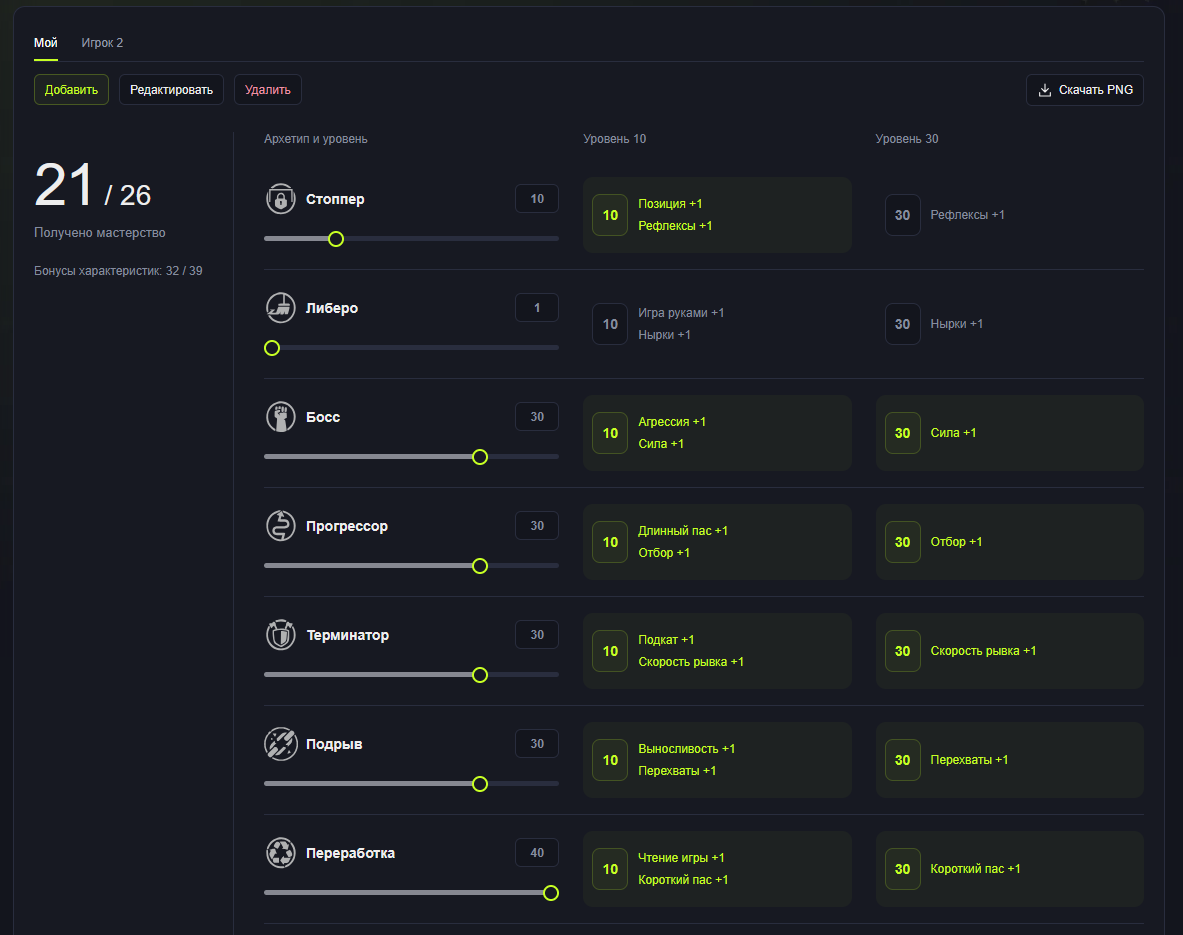
Archetype bonuses are calculated from the levels you enter. The planner shows rewards at level 10 and 30 thresholds, available attribute bonuses and mastery progress.
Club boosts are your team's attribute bonuses and additional PlayStyles. Enter your club's available boosts and styles manually.
These settings do not change your in-game account or upgrade your player automatically. They make ClubsLab calculations reflect your actual conditions or progression plan.
Set up archetype bonuses
- Open Archetype bonuses.
- Select a preset or choose Add to create one.
- Enter your developed archetype levels using the number, slider or minus and plus controls.
- Check the rewards: level 10 and 30 thresholds light up when reached.
- Enable the bonus source to use this preset in calculations.
Enter all archetypes that have earned permanent rewards, not just your current build's archetype. The player's builder level sets that build's capabilities, while the archetype level preset describes earned bonuses.
Create a separately named preset for future progression. You can assess a plan while preserving your actual levels.
Set up your club
- Open Club boosts.
- Choose Add or select an existing club preset.
- Enter your team's available attribute bonuses.
- Select additional club .
- Enable club boosts and check the active preset.
You can keep multiple club presets for different teams or conditions. Edit manages presets; Delete removes an unwanted one.
Do not put a temporary Amp into a club bonus. It is a different source, and ClubsLab currently has no separate selector.
What boosts change
Bonuses raise final attributes up to 99 without spending . They do not meet personal PlayStyle attribute requirements: those require actual upgrades.
A club PlayStyle is accounted for separately and does not use a personal slot. You do not need to select it again as a personal style.
Use presets in the finder
Open the archetype finder and Boosts. Select your club and archetype bonus preset, then check both switches.
Both sources are enabled on your first visit. Later, the site remembers your choices. Reset clears search targets but keeps boost switches and presets.
If results are missing or ratings differ unexpectedly, check that you have not selected a planned preset instead of your actual setup. See the finder guide.
Builder, comparison and saved builds
Check boost sources and display mode in the builder. Use the same conditions in comparison so differences come from the builds themselves.
Account builds use their owner's shared boost settings. Changing those presets may therefore change final ratings even when AP allocation stays the same.
Account settings are stored on the server; guest settings stay in this browser. Both boost pages have Download PNG to share a preset with your team.
If ratings do not match the game
- Check archetype, level and body settings.
- Verify actual levels in your archetype bonus preset.
- Check the club preset and both bonus switches.
- Compare raw ratings with raw ratings, and final ratings with final ratings.
- Make sure the game screen is not showing a temporary Amp effect.
Comments 0
To post a comment, sign in.
Comment deleted by its author.
Comment deleted by its author.
Comment deleted by its author.